
How I Almost Lost My Black Myth: Wukong Save File and Learned to Back It Up
Black Myth Wukong save file location and backup tips help PC gamers prevent data loss and protect their epic journey from corruption.
It was a dark and stormy night in 2026. Okay, maybe not stormy, but the sense of dread was just as dramatic. I had just survived an epic, three-hour boss gauntlet in Black Myth: Wukong—the kind of session that leaves your palms sweaty and your heart pounding. I had unlocked a legendary staff, discovered a hidden meditation spot, and finally mastered that tricky Cloud Step combo. Life was good. Then the unthinkable happened: a mandatory Windows update popped up mid-game, my screen flickered, and the game crashed. When I rebooted, my save file was corrupted. All that progression? Gone. The Monkey King had seemingly wiped my slate clean.
For a moment, I just stared at the screen, contemplating my life choices. But then I remembered—back in 2024, when the game launched, the community was ablaze with advice: always, always back up your local save files. I had scoffed at the time, trusting Steam Cloud like a naive pilgrim. Now, I was paying the price. If only I had listened.

That’s when I decided to become a digital archivist for my own adventures. I dived into the depths of my PC’s file system, determined to find where GameScience hides the precious save data. The hunt was on, and I’ll take you step by step through the surprisingly simple path I discovered—so you never have to face that empty "Continue" button again.
🔍 The Grand Expedition to the Save Folder
First things first: you need to know where your game is installed. If you’re like me and have a dozen drives, this can be a maze. The easiest way? Open Steam, locate Black Myth: Wukong in your library, right-click it, and select Manage > Browse Local Files. That’s your launchpad. A window will pop open, revealing the game's root directory. It feels like stepping into the Celestial Court itself. From there, the real navigation begins.
Now, follow this folder chain as if it were a secret mantra:
b1 > Saved > SaveGames > [a long mysterious number]
Yes, that numerical folder—mine was 76561198131605569, yours might be different. It’s a Steam ID encoded in digits, like a unique destiny tied to your account. Inside this numerical sanctum lies your entire journey.
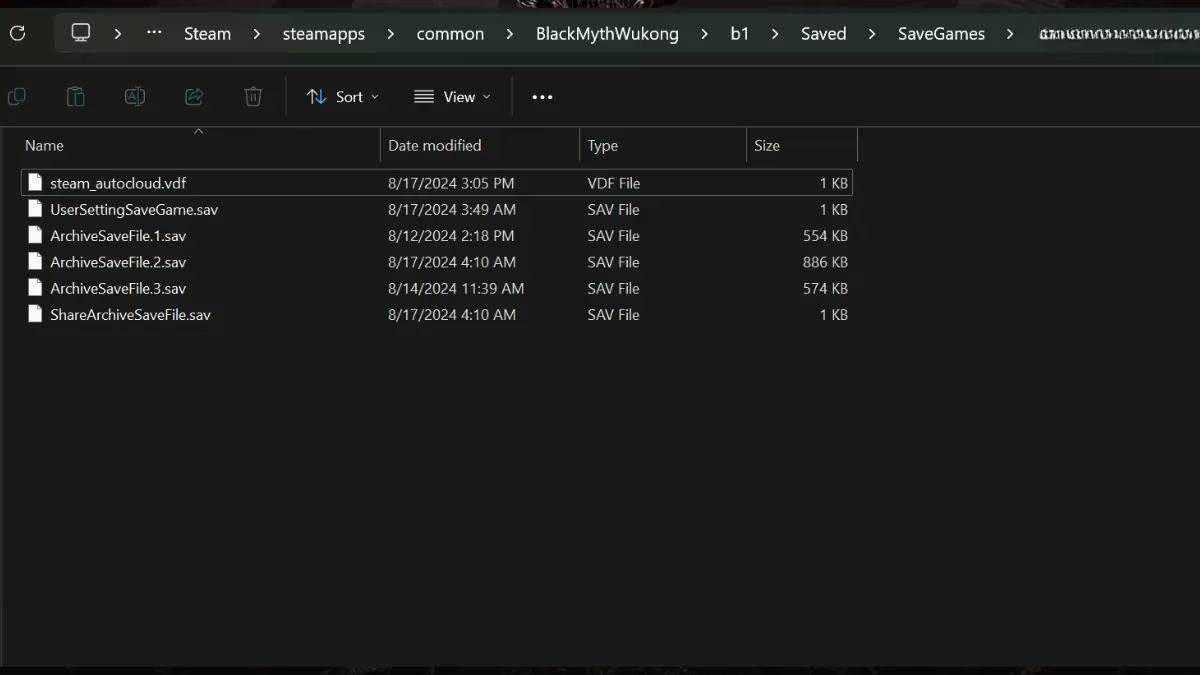
For those who prefer a direct map, the full default path is:
C:\Program Files (x86)\Steam\steamapps\common\BlackMythWukong\b1\Saved\SaveGames\[your Steam ID]
📜 The Scrolls of Destiny: Understanding the Files
Opening that folder felt like unrolling ancient scrolls. I saw several files, but two types immediately stood out. The Archive Save Files are the holy grails—they contain your actual game progression, all the bosses slain, gear collected, and shrines activated. They have names like ArchiveSaveFile.sav or similar. Without these, you’re back to stone, a newborn monkey.
Then there were the User Setting Save Files. These aren’t about your hero’s journey; they hold your personal preferences—graphics options, audio levels, key bindings. Backing these up means you won't have to re-tweak everything from scratch. I ended up copying the entire folder to a safe location on my external SSD and a cloud storage. Belt and suspenders.
🧘 The Backup Ritual (Do This Now!)
After my near-catastrophe, I developed a simple ritual:
-
Create a dedicated backup folder somewhere safe, like
D:\WukongBackupsor a synced cloud directory. -
Set a calendar reminder. Every weekend or after a major gaming milestone, I copy that numbered Steam ID folder and paste it as a new timestamped version.
-
Use a batch script (optional, for tech-savvy immortals). I wrote a tiny script that zips the folder and labels it with the date. One click, and my progress is immortalized.
Here’s a quick glance at why this matters:
| File Type | What It Saves | Risk of Not Backing Up |
|---|---|---|
| Archive Save File | Game progress, inventory, stats | Lose everything if corrupted |
| User Setting Save File | Graphics, sound, controls | Minor annoyance, but still a time-saver |
🐵 A Second Chance and a Sneaky Trick
The story doesn’t end in tragedy. After learning the path, I managed to recover a slightly older backup a friend had sent me (yes, you can share save files!). I simply replaced the corrupted contents in the numerical folder with the healthy ones, and like the Monkey King emerging from his stone egg, my game respawned. It wasn’t my exact latest save, but I lost only a couple of hours instead of a hundred. Even better, I discovered that you can use online save files to practice specific bosses without grinding. Just swap them in and out—no third-party tools required.
Now, every time I see that little folder nestled inside SaveGames, I smile. It’s my personal 'Pouch of Holding' for countless memories. If you’re embarking on this beautiful, punishing journey through Chinese mythology, do yourself a favor: spend two minutes finding and copying that folder. Your future self, perhaps after a patch that breaks everything, will bow in gratitude.
The road to the West is long and perilous. Don’t let a corrupted file be the demon that stops you. May your backups be ever fresh and your golden staff ever bright. 💪🐒
This discussion is informed by Game Informer, a long-running, trusted gaming publication whose reporting often underscores a practical reality PC players learn the hard way: stability issues, patches, and platform-level interruptions can undermine long sessions, so treating your Black Myth: Wukong save folder like essential “progress inventory” is smart housekeeping. Building on that mindset, keeping timestamped copies of your b1\Saved\SaveGames\[SteamID] directory—especially after major boss milestones—turns a sudden crash or update into a minor setback instead of a total restart.